> ## Documentation Index
> Fetch the complete documentation index at: https://docs.lidottrade.xyz/llms.txt
> Use this file to discover all available pages before exploring further.
# Getting Started
> Start trading on Lighter.xyz directly from Telegram
## Setting up the bot
Open the Lighter bot and run `/start` to begin. The bot will automatically create a secure Turnkey wallet for you.
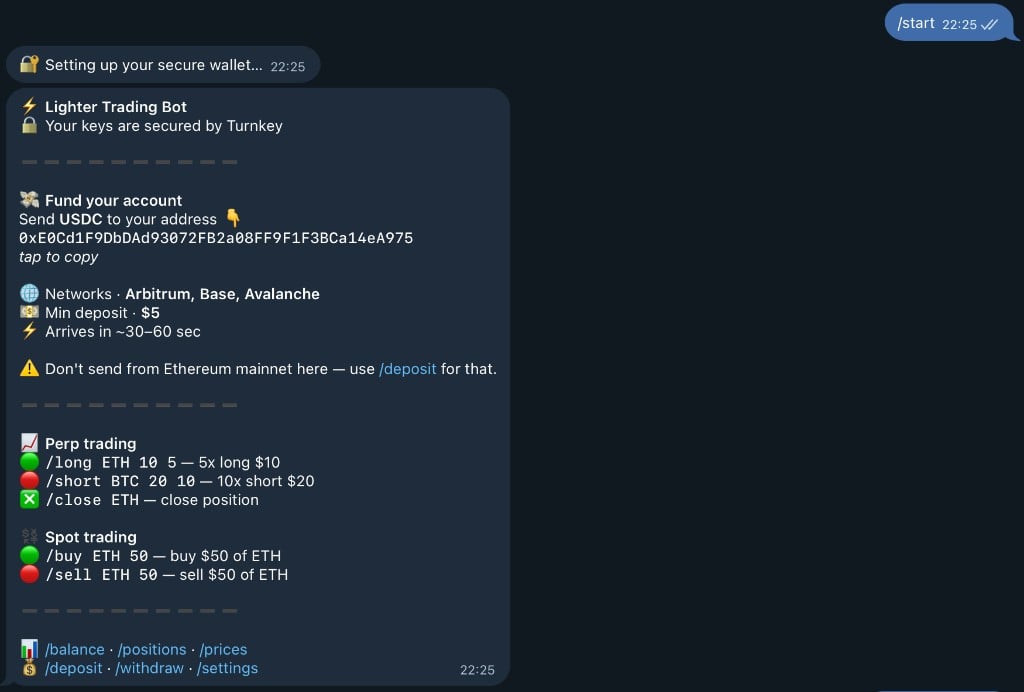 You'll receive:
* 📍 Your wallet address (tap to copy)
* 🔒 Turnkey security confirmation
* 💳 Instructions for funding your account
* 🎯 Quick start commands
## Depositing
Next, deposit funds to your wallet. You can send USDC on Ethereum Mainnet. Run `/deposit` to view the address you can send to. You must deposit at least **\$10 USDC** to begin trading.
You'll receive:
* 📍 Your wallet address (tap to copy)
* 🔒 Turnkey security confirmation
* 💳 Instructions for funding your account
* 🎯 Quick start commands
## Depositing
Next, deposit funds to your wallet. You can send USDC on Ethereum Mainnet. Run `/deposit` to view the address you can send to. You must deposit at least **\$10 USDC** to begin trading.
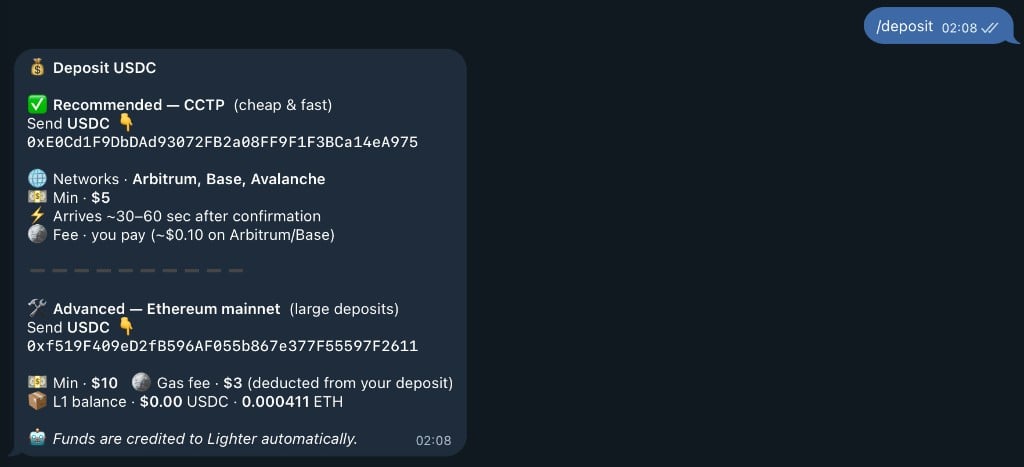 **First deposit fee:** \$3 (for gas costs)
Once you send USDC to your wallet address, the bot will automatically detect it and process the deposit:
**First deposit fee:** \$3 (for gas costs)
Once you send USDC to your wallet address, the bot will automatically detect it and process the deposit:
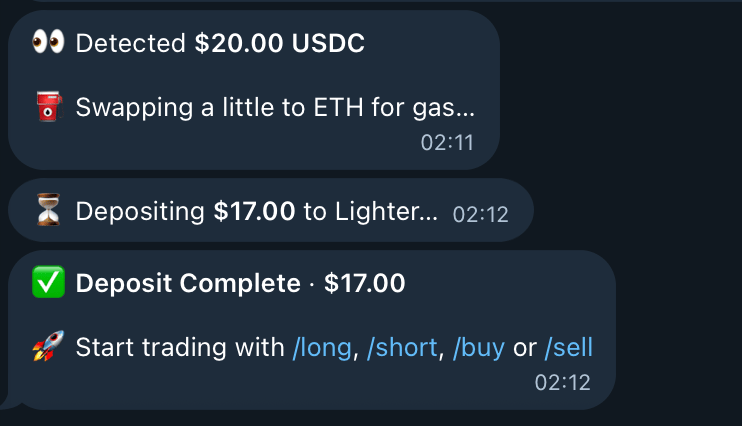 The bot will:
* 👀 Detect your USDC deposit
* 💱 Automatically swap some USDC to ETH for gas
* ✅ Confirm successful deposit
* 🎉 Notify you're ready to trade!
## Opening your first position
Once your account is funded, type `/long` or `/short` to open a position.
The bot will:
* 👀 Detect your USDC deposit
* 💱 Automatically swap some USDC to ETH for gas
* ✅ Confirm successful deposit
* 🎉 Notify you're ready to trade!
## Opening your first position
Once your account is funded, type `/long` or `/short` to open a position.
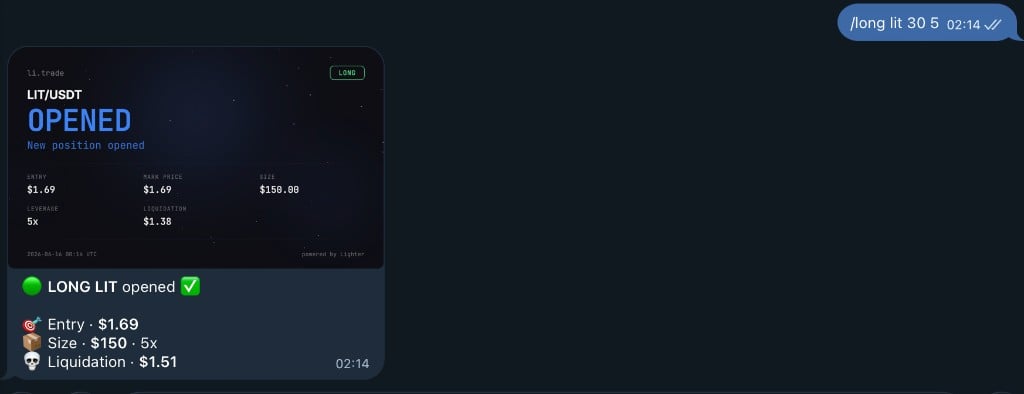 You will then be prompted to enter the asset, amount, and leverage. The bot will show you a detailed preview of your trade:
 The preview shows:
* 🪙 Asset and entry price
* 💰 Position size (leverage × margin)
* 💵 Your margin amount
* ⚡ Leverage
* 🔻 Estimated liquidation price
* 📊 Balance after opening
Confirm the trade and the bot will execute your order:
The preview shows:
* 🪙 Asset and entry price
* 💰 Position size (leverage × margin)
* 💵 Your margin amount
* ⚡ Leverage
* 🔻 Estimated liquidation price
* 📊 Balance after opening
Confirm the trade and the bot will execute your order:
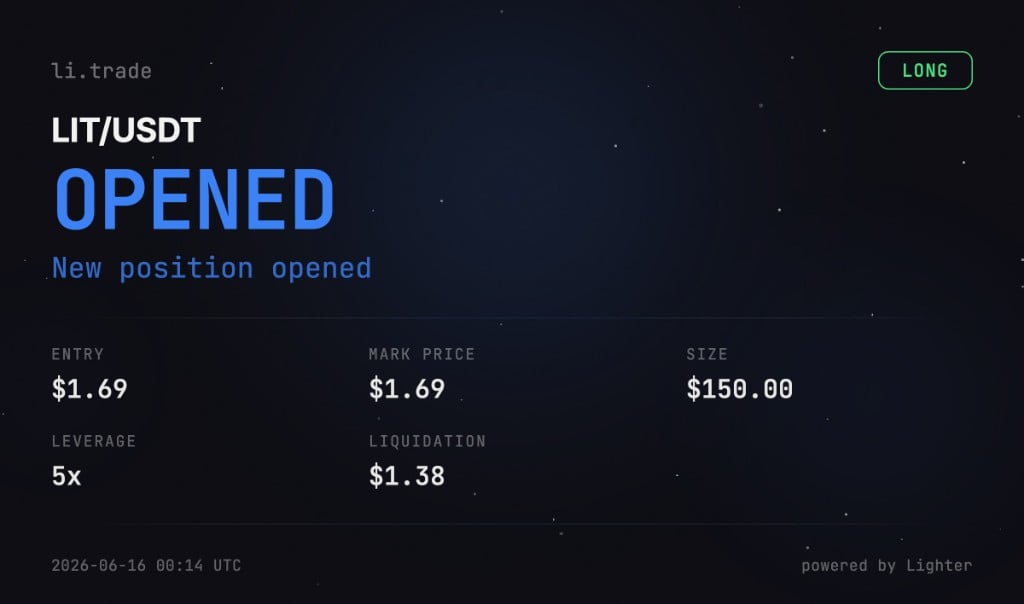 You'll receive a beautiful position card showing all the details of your opened trade!
## Viewing your positions
Now that you have an open position, you can view your positions with the `/positions` command. You'll see beautiful visual cards showing all your position details including PnL, leverage, and liquidation price.
You'll receive a beautiful position card showing all the details of your opened trade!
## Viewing your positions
Now that you have an open position, you can view your positions with the `/positions` command. You'll see beautiful visual cards showing all your position details including PnL, leverage, and liquidation price.
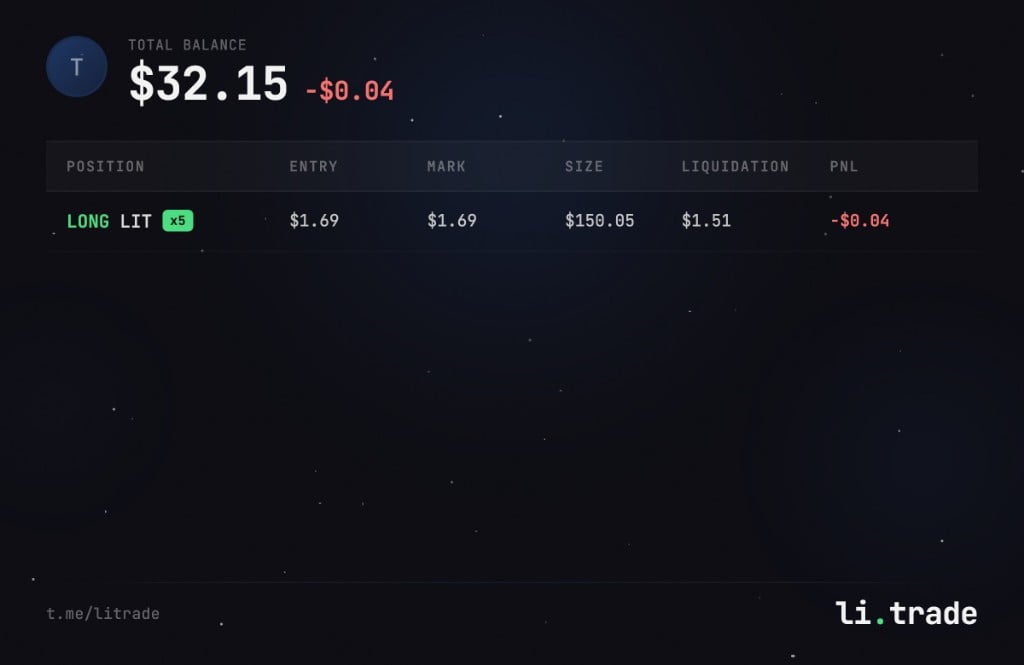 The positions card displays:
* 📊 Current position details
* 💰 Real-time PnL (profit/loss)
* 📍 Entry price and mark price
* 📏 Position size
* 🔻 Liquidation price
* 🔄 Refresh button to update data
You can also use `/pnl` to see detailed profit and loss information for each position.
## Closing your position
When you're ready to close your position and take profits (or cut losses), use the `/close` command followed by the asset name.
The positions card displays:
* 📊 Current position details
* 💰 Real-time PnL (profit/loss)
* 📍 Entry price and mark price
* 📏 Position size
* 🔻 Liquidation price
* 🔄 Refresh button to update data
You can also use `/pnl` to see detailed profit and loss information for each position.
## Closing your position
When you're ready to close your position and take profits (or cut losses), use the `/close` command followed by the asset name.
 **Quick close:** You can also specify the percentage directly in the command:
* `/close BTC 100` - close 100% of BTC position
* `/close ETH 50` - close 50% of ETH position
* `/close LIT 25` - close 25% of LIT position
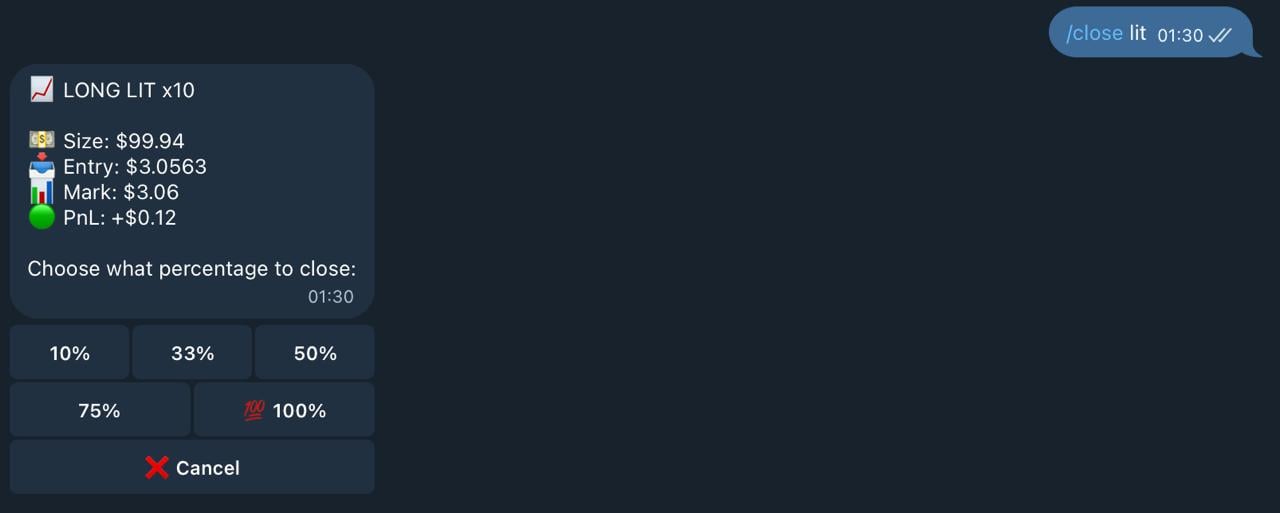
The bot will show you the current position details and ask what percentage you want to close:
**Quick close:** You can also specify the percentage directly in the command:
* `/close BTC 100` - close 100% of BTC position
* `/close ETH 50` - close 50% of ETH position
* `/close LIT 25` - close 25% of LIT position
The bot will show you the current position details and ask what percentage you want to close:
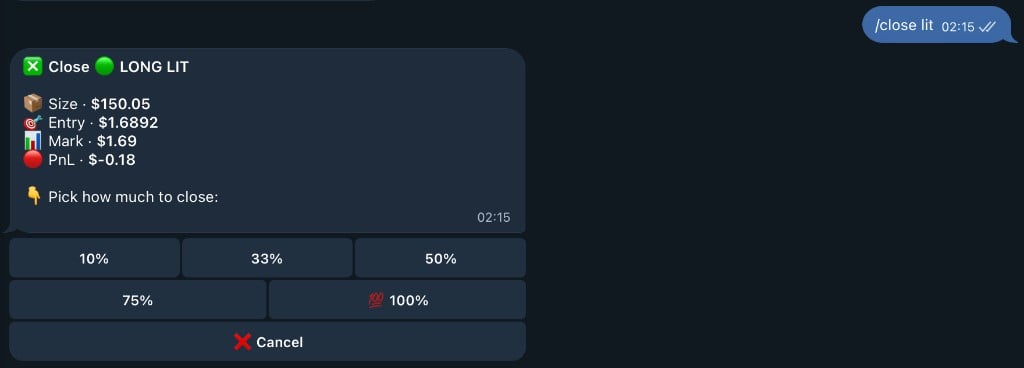 You can choose to close:
* 10% - partial close
* 33% - one third
* 50% - half position
* 75% - three quarters
* 💯 100% - full position close
After confirming, you'll receive a beautiful card showing your closed position with final PnL:
You can choose to close:
* 10% - partial close
* 33% - one third
* 50% - half position
* 75% - three quarters
* 💯 100% - full position close
After confirming, you'll receive a beautiful card showing your closed position with final PnL:
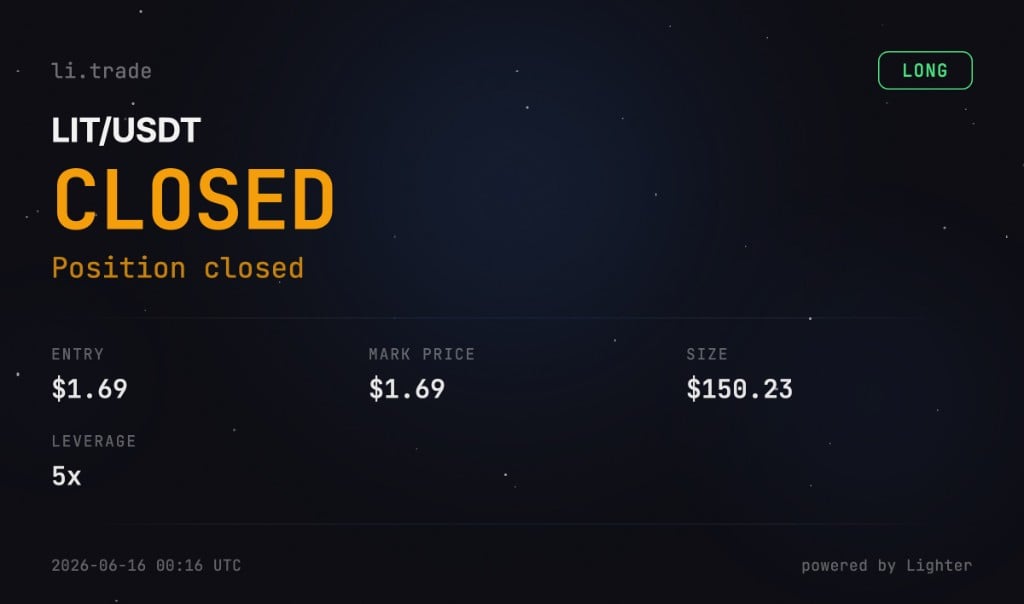 The close card displays:
* 💰 Final profit or loss
* 📍 Entry and exit prices
* 📏 Position size
* 📊 Percentage gain/loss
## You're done!
🎉 **Welcome to li.trade!** You've successfully completed your first trade on Lighter.xyz.
### What's Next?
**Master Your Trading:**
* `/pnl` — Track your real-time profit and loss
* `/balance` — Monitor your PERP and SPOT balances
* `/sl` and `/tp` — Set stop loss and take profit orders
* `/limit` — Place advanced limit orders
**Explore Markets:**
* `/prices` — Browse 100+ trading pairs with live prices
* `/price BTC` — Get detailed price info for any asset
**Compete & Earn:**
* `/leaderboard` — Climb the trader rankings
* `/invite` — Share your referral link and earn 10% of points
* Trade more to earn weekly points distribution
**Stay Protected:**
* Always set stop losses to manage risk
* Start with lower leverage until you're comfortable
* Use `/positions` to monitor all your trades in real-time
### Explore More Commands
Check out all available commands to unlock the full potential of li.trade! Use `/help` anytime or explore our [Commands](/commands) page for the complete list.
Ready to become a top trader? Let's go! 🚀
The close card displays:
* 💰 Final profit or loss
* 📍 Entry and exit prices
* 📏 Position size
* 📊 Percentage gain/loss
## You're done!
🎉 **Welcome to li.trade!** You've successfully completed your first trade on Lighter.xyz.
### What's Next?
**Master Your Trading:**
* `/pnl` — Track your real-time profit and loss
* `/balance` — Monitor your PERP and SPOT balances
* `/sl` and `/tp` — Set stop loss and take profit orders
* `/limit` — Place advanced limit orders
**Explore Markets:**
* `/prices` — Browse 100+ trading pairs with live prices
* `/price BTC` — Get detailed price info for any asset
**Compete & Earn:**
* `/leaderboard` — Climb the trader rankings
* `/invite` — Share your referral link and earn 10% of points
* Trade more to earn weekly points distribution
**Stay Protected:**
* Always set stop losses to manage risk
* Start with lower leverage until you're comfortable
* Use `/positions` to monitor all your trades in real-time
### Explore More Commands
Check out all available commands to unlock the full potential of li.trade! Use `/help` anytime or explore our [Commands](/commands) page for the complete list.
Ready to become a top trader? Let's go! 🚀